Pistachiout的博客

每天多学一点知识,就少写一行代码

Thymeleaf学习笔记

1.什么是Thymeleaf

Thymeleaf是一个XML/XHTML/HTML5模板引擎,可用于Web与非Web环境中的应用开发,它是一个开源的Java库。Thymeleaf提供了一个用于整合Spring MVC的可选模块,Thymeleaf的主要目标在于提供一种可被浏览器正确显示的、格式良好的模板创建方式,因此也可以用作静态建模。你可以使用它创建经过验证的XML与HTML模板,它的特点便是:开箱即用。

2.Springboot整合thymeleaf

实现的步骤为:

1. 创建一个sprinboot项目
2. 添加thymeleaf的起步依赖
3. 添加spring web的起步依赖
4. 编写html 使用thymleaf的语法获取变量对应后台传递的值
5. 编写controller 设置变量的值到model中

pom.xml

1
2
3
4
5
6
7
8
9
10
11
12
13
14
15
16
17
18
19
20
21
22
23
24
25
26
27
28
29
30
31
32
33
<?xml version="1.0" encoding="UTF-8"?>
<project xmlns="http://maven.apache.org/POM/4.0.0"
xmlns:xsi="http://www.w3.org/2001/XMLSchema-instance"
xsi:schemaLocation="http://maven.apache.org/POM/4.0.0 http://maven.apache.org/xsd/maven-4.0.0.xsd">
<modelVersion>4.0.0</modelVersion>

<groupId>com.itheima</groupId>
<artifactId>springboot-thymeleaf</artifactId>
<version>1.0-SNAPSHOT</version>

<parent>
<groupId>org.springframework.boot</groupId>
<artifactId>spring-boot-starter-parent</artifactId>
<version>2.1.4.RELEASE</version>
</parent>

<dependencies>
<!--web起步依赖
Tomcat
Springmvc 引赖Jar包 一个中心 三大组件
-->
<dependency>
<groupId>org.springframework.boot</groupId>
<artifactId>spring-boot-starter-web</artifactId>
</dependency>

<!--thymeleaf配置-->
<dependency>
<groupId>org.springframework.boot</groupId>
<artifactId>spring-boot-starter-thymeleaf</artifactId>
</dependency>
</dependencies>
</project>

创建application.yml,并设置thymeleaf的缓存设置,设置为false。

1
2
3
spring:
thymeleaf:
cache: false

在resources中创建templates目录,在templates目录创建index.html,代码如下:

1
2
3
4
5
6
7
8
9
<!doctype html>
<html lang="ch" xmlns:th="http://www.thymeleaf.org">
<head>
<meta charset="UTF-8">
<title th:text="|lookroot-${title}|">默认的标题</title>
<meta name="description" th:content="${description}">
<meta name="keywords" th:content="${keywords}">
</head>
</html>

<html xmlns:th="http://www.thymeleaf.org">这句声明使用thymeleaf标签
<title th:text="${title}">默认的标题</title>这句使用 th:text=”${变量名}” 表示 使用thymeleaf获取文本数据,类似于EL表达式。

<title th:text="|lookroot-${title}|">默认的标题</title>假如我们的 th:text 标签里面需要拼接字符串${title}可以使用||来包裹

创建controller用于测试后台 设置数据到model中。

1
2
3
4
5
6
7
8
9
10
@Controller
public class IndexController {
@GetMapping("/index")
public String index(Model model) {
model.addAttribute("title", "传递的标题");
model.addAttribute("description", "传递的描述");
model.addAttribute("keywords", "传递的关键字");
return "index";
}
}

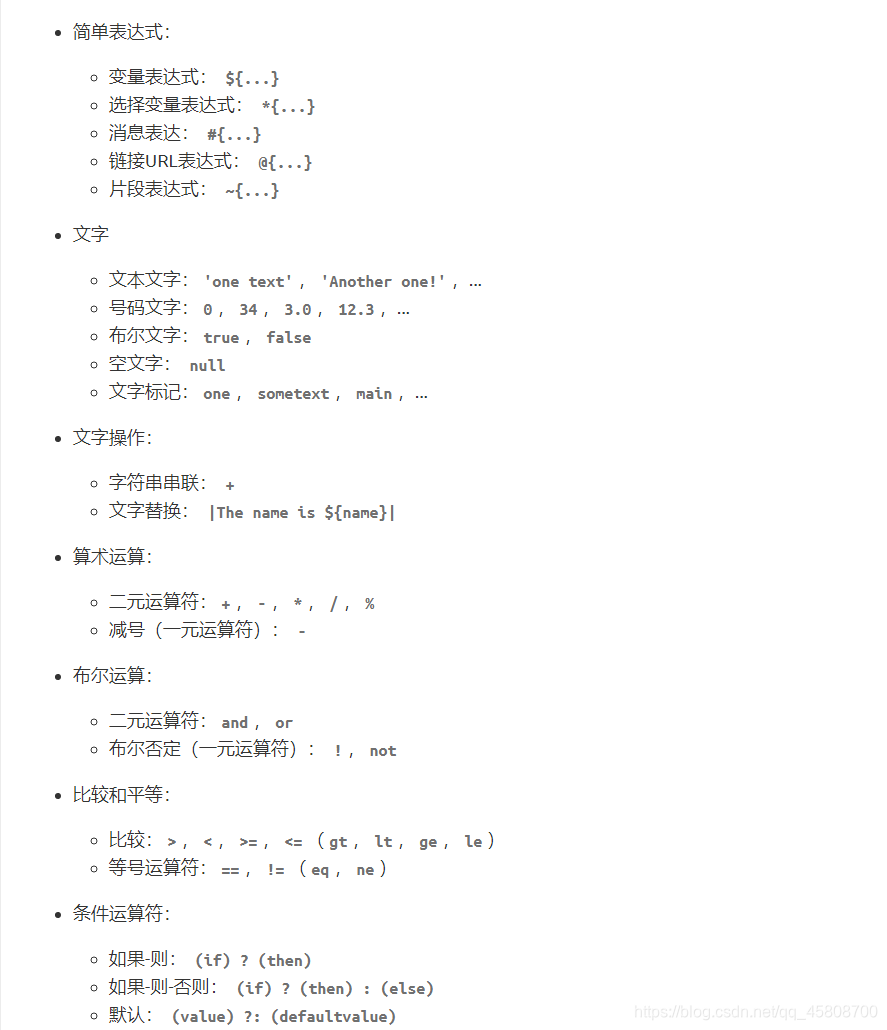
Thymeleaf常用语法

在这里插入图片描述

渲染对象

创建一个基本对象UserVO

1
2
3
4
5
6
7
8
9
@Data
public class UserVO {
private String username;
private Integer age;
private Integer sex;
private Boolean isVip;
private Date createTime;
private List<String> tags;
}

新建一个方法basic,将user对象传输到页面中

1
2
3
4
5
6
7
8
9
10
11
@GetMapping("/basicTrain")
public String basic(Model model) {
UserVO userVO = new UserVO();
userVO.setAge(21);
userVO.setSex(1);
userVO.setCreateTime(new Date());
userVO.setTags(Arrays.asList("Java", "PHP", "Node"));
userVO.setUsername("lookroot");
model.addAttribute("user", userVO);
return "basic";
}

新建basic.html,此时如果我们想渲染User这个对象的信息我们可以这样

1
2
3
4
<div>
<h2 th:text="${user.getUsername()}"></h2>
<p th:text="${user.getAge()}"></p>
</div>

也可以将User定义为临时变量,接着使用*{xxx}就能取到值了

1
2
3
4
<div th:object="${user}">
<h2 th:text="*{username}"></h2>
<p th:text="*{age}"></p>
</div>

还可以不使用get的方式,直接使用属性名

1
<h2 th:text="${user.username}" ></h2>

th:if使用

th:if通过布尔值决定这个元素是否渲染

1
<p th:if="${user.isVip}">会员</p>

th:each使用

th:each可以迭代循环出数据,前面我们User对象里面的tags是一个数组,我们来渲染一下

1
2
3
4
<ul>
<li th:each="tag:${user.getTags()}"
th:text="${tag}"></li>
</ul>

状态变量在th:each属性中定义,并且包含以下数据:

当前的迭代索引,从0开始。这是index属性。.
从1开始的当前迭代索引。这是count属性。
迭代变量中元素的总数。这是size财产。
每次迭代的iter变量。这是current财产。
当前迭代是偶数还是奇数。这些是even/odd布尔属性。
当前迭代是否是第一个。这是first布尔属性。
当前迭代是否为最后一次。这是last布尔属性

th:switch使用

th:switch选择语句

1
2
3
4
5
<div th:switch="${user.getSex()}">
<p th:case="'1'">男</p>
<p th:case="'2'">女</p>
<p th:case="*">默认</p>
</div>

url

如果在springboot中需要引入static目录下的静态资源可以使用@{xxx}的方式

1
<link th:href="@{/app.css}" rel="stylesheet">

JavaScript动态渲染

1
2
3
4
<script th:inline="javascript">
const user = /*[[${user}]]*/ {};
console.log(user);
</script>

同理css也是可以的

1
2
3
4
5
<style th:inline="css">
.main\ elems {
text-align: /*[[${align}]]*/ left;
}
</style>

Thymeleaf碎片(组件)

th:fragment

新建一个component.html,一个文件里面可以写多个碎片,使用th:fragment来定义

1
2
3
4
5
6
7
<footer th:fragment="com1">
this is com1
</footer>

<footer id="com2">
this is com2
</footer>

使用碎片主要有两种方式replace和insert,在index.html中编写

1
2
3
4
<!--replace-->
<div th:replace="~{component::com1}"></div>
<!--insert-->
<div th:insert="~{component::com1}"></div>

这两种方式的区别就是,replace会将新标签完全替换原本的标签,也就是说原本写th:replace属性的标签就不会渲染出来,insert是往这个地方插入标签

直接通过选择器使用

对于碎片,甚至可以不定义,我们再次添加一个 碎片

1
2
3
<footer id="com2">
this is com2
</footer>

然后使用它

1
<div th:insert="~{component::#com2}"></div>

注释类型

在碎片里面,我们是可以使用控制传递的数据的,比如上面的User对象,但是开发工具在component.html页面中可能不能识别到User对象,我们可以打一个注释

1
2
<!--/*@thymesVar id="user" type="cn.lookroot.loop.thymeleafdemo.vo.UserVO"*/-->
<div th:text="${user.getUsername()}"></div>

组件传递参数

组件也是可以传递数据的

1
2
3
<div th:fragment="com3(message)">
<p th:text="${message}"></p>
</div>

使用的时候

1
<div th:insert="~{component::com3('传递数据')}"></div>

局部替换组件

我们使用一个组件的时候,想要局部替换掉这个组件里面的部分内容该怎么做呢?通过传递参数的方式传递一个组件过来,并把这个组件替换原本的一部分

1
2
3
<div th:fragment="com4(message)">
<p th:replace="${message}">原本的message</p>
</div>

使用的时候

1
2
3
<div th:insert="~{component::com4(~{::#message})}">
<p id="message">替换的message</p>
</div>

基本对象

ctx:上下文对象

1
2
3
4
${#ctx.request}
${#ctx.response}
${#ctx.session}
${#ctx.servletContext}

请求/会话属性

1
2
3
${session.xxx}                 
${application.xxx}
${#request.getAttribute('xxx')}

工具类

在thymeleaf里面是可以直接使用一些Java的函数的,并且你可以通过传递参数的方式把一些自己写的方法传递给页面,在里面调用也是可以的

#dates
#calendars
#strings
#numbers
#objects
#bools
#arrays
#lists
#sets
#maps
#aggregates

以日期格式化来举例

1
2
<!--日期格式化-->
<p th:text="${#dates.format(user.createTime,'yyyy-MM-dd HH:mm')}"></p>
-------------本文结束感谢您的阅读-------------