一、实验内容
构建应用界面布局
构建Service组件
实现简单的音乐播放器
1
2
3
4
5
6
7
8
9
10
11
12
13
14
15
16
17
18
19
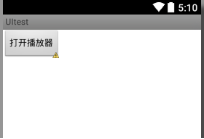
<?xml version="1.0" encoding="utf-8" ?> <androidx.constraintlayout.widget.ConstraintLayout xmlns:android="http://schemas.android.com/apk/res/android" xmlns:app="http://schemas.android.com/apk/res-auto" xmlns:tools="http://schemas.android.com/tools" android:layout_width="match_parent" android:layout_height="match_parent" tools:context=".MainActivity" > <Button android:id="@+id/start" android:layout_width="wrap_content" android:layout_height="wrap_content" android:layout_marginStart="19dp" android:layout_marginLeft="19dp" android:layout_marginTop="23dp" android:text="打开播放器" app:layout_constraintStart_toStartOf="parent" app:layout_constraintTop_toTopOf="parent" /> </androidx.constraintlayout.widget.ConstraintLayout>
1
2
3
4
5
6
7
8
9
10
11
12
13
14
15
16
17
18
19
20
21
22
23
24
25
26
27
28
29
30
31
32
33
34
35
36
37
38
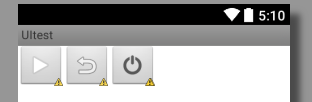
<?xml version="1.0" encoding="utf-8" ?> <androidx.constraintlayout.widget.ConstraintLayout xmlns:android="http://schemas.android.com/apk/res/android" xmlns:app="http://schemas.android.com/apk/res-auto" xmlns:tools="http://schemas.android.com/tools" android:layout_width="match_parent" android:layout_height="match_parent" tools:context=".musicplayer" > <ImageButton android:id="@+id/btn_play" android:layout_width="wrap_content" android:layout_height="wrap_content" android:layout_marginStart="4dp" android:layout_marginLeft="4dp" android:layout_marginTop="16dp" app:layout_constraintStart_toStartOf="parent" app:layout_constraintTop_toTopOf="parent" app:srcCompat="@android:drawable/ic_media_play" /> <ImageButton android:id="@+id/btn_return" android:layout_width="wrap_content" android:layout_height="wrap_content" app:layout_constraintStart_toEndOf="@+id/btn_play" app:layout_constraintTop_toTopOf="@+id/btn_play" app:srcCompat="@android:drawable/ic_menu_revert" /> <ImageButton android:id="@+id/btn_stop" android:layout_width="wrap_content" android:layout_height="wrap_content" android:layout_marginStart="10dp" android:layout_marginLeft="10dp" app:layout_constraintBottom_toBottomOf="@+id/btn_return" app:layout_constraintStart_toEndOf="@+id/btn_return" app:srcCompat="@android:drawable/ic_lock_power_off" /> </androidx.constraintlayout.widget.ConstraintLayout>
1
2
3
4
5
6
7
8
9
10
11
12
13
14
15
16
17
18
19
20
21
22
23
24
25
package com.example.myapplication7;import androidx.appcompat.app.AppCompatActivity;import android.content.Intent;import android.os.Bundle;import android.view.View;import android.widget.Button;public class MainActivity extends AppCompatActivity { @Override protected void onCreate (Bundle savedInstanceState) { super .onCreate(savedInstanceState); setContentView(R.layout.activity_main); Button bt = findViewById(R.id.start); bt.setOnClickListener(new View .OnClickListener() { @Override public void onClick (View v) { Intent intent = new Intent (MainActivity.this ,musicplayer.class); startActivity(intent); } }); } }
1
2
3
4
5
6
7
8
9
10
11
12
13
14
15
16
17
18
19
20
21
22
23
24
25
26
27
28
29
30
31
32
33
34
35
36
37
38
39
40
41
42
43
44
45
46
47
48
49
50
51
52
53
54
55
package com.example.myapplication7;import androidx.appcompat.app.AppCompatActivity;import android.content.Intent;import android.os.Bundle;import android.view.View;import android.widget.ImageButton;import android.widget.Toast;public class musicplayer extends AppCompatActivity { @Override protected void onCreate (Bundle savedInstanceState) { super .onCreate(savedInstanceState); setContentView(R.layout.musicplayer); final Intent intent = new Intent (musicplayer.this ,MusicService.class); ImageButton btn_play=(ImageButton) findViewById(R.id.btn_play); btn_play.setOnClickListener(new View .OnClickListener() { @Override public void onClick (View v) { if ( MusicService.isplay==false ) {startService(intent); Toast.makeText(getApplicationContext(), "正在播放" , Toast.LENGTH_LONG).show(); } else {stopService(intent); Toast.makeText(getApplicationContext(), "暂停播放" , Toast.LENGTH_LONG).show();} }}); ImageButton btn_return=(ImageButton) findViewById(R.id.btn_return); btn_return.setOnClickListener(new View .OnClickListener() { @Override public void onClick (View v) { if ( MusicService.isplay==true ) { Intent intent2 = new Intent ( musicplayer.this ,MainActivity.class); startActivity(intent2); Toast.makeText(getApplicationContext(), "正在播放" , Toast.LENGTH_LONG).show(); } }}); ImageButton btn_stop=(ImageButton) findViewById(R.id.btn_stop); btn_stop.setOnClickListener(new View .OnClickListener() { @Override public void onClick (View v) { if ( MusicService.isplay==true ) {stopService(intent); Intent intent1 = new Intent ( musicplayer.this ,MainActivity.class); startActivity(intent1); Toast.makeText(getApplicationContext(), "停止播放" , Toast.LENGTH_LONG).show(); } }}); } }
1
2
3
4
5
6
7
8
9
10
11
12
13
14
15
16
17
18
19
20
21
22
23
24
25
26
27
28
29
30
31
32
33
34
35
36
37
38
39
40
41
42
43
44
package com.example.myapplication7;import android.app.Service;import android.content.Intent;import android.media.MediaPlayer;import android.os.IBinder;public class MusicService extends Service { static boolean isplay; MediaPlayer player; public MusicService () { } @Override public void onCreate () { player = MediaPlayer.create(this ,R.raw.for_love); super .onCreate(); } @Override public int onStartCommand (Intent intent, int flags, int startId) { if (!player.isPlaying()) {player.start(); isplay=player.isPlaying(); } return super .onStartCommand(intent, flags, startId); } @Override public void onDestroy () { player.stop(); isplay=player.isPlaying(); player.release(); super .onDestroy(); } @Override public IBinder onBind (Intent intent) { throw new UnsupportedOperationException ("Not yet implemented" ); } }
MusicService:通过重写OnCreate(),onDestroy(),onStartCommand()实现后台service的music播放
1
2
3
4
5
6
7
8
9
10
11
12
13
14
15
16
17
18
19
20
21
22
23
24
25
26
27
<?xml version="1.0" encoding="utf-8" ?> <manifest xmlns:android="http://schemas.android.com/apk/res/android" package ="com.example.myapplication7" > <application android:allowBackup="true" android:icon="@mipmap/ic_launcher" android:label="@string/app_name" android:roundIcon="@mipmap/ic_launcher_round" android:supportsRtl="true" android:theme="@style/Theme.MyApplication7" > <service android:name=".MusicService" android:enabled="true" android:exported="true" ></service> <activity android:name=".musicplayer" /> <activity android:name=".MainActivity" > <intent-filter> <action android:name="android.intent.action.MAIN" /> <category android:name="android.intent.category.LAUNCHER" /> </intent-filter> </activity> </application> </manifest>