Pistachiout的博客

每天多学一点知识,就少写一行代码

Android 数据库编程SQLite

Android 数据库编程SQLite

一、实验内容

1. 构建应用界面布局

(1)新建一个安卓工程,在默认的layout主界面中添加一个列表(ListView),列表绑定一个SimpleAdapter关联学生信息(学号、姓名)。
(2)为ListView添加上下文菜单,菜单中包含两个选项(修改学生,删除学生),分别对应学生信息的修改和删除操作。为每个选项添加点击事件完成相应的操作,其中点击修改学生时启动“updateStu”Activity组件。
(3)在ListView下方添加一个按钮(Button),内容为“添加学生”,为按钮添加点击事件,单击按钮是启动“addStu”Activity组件。
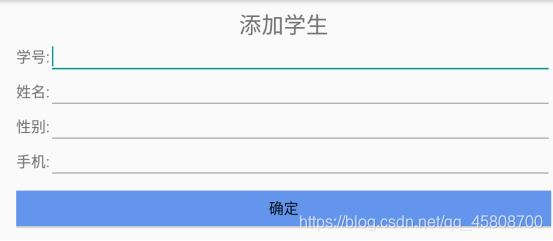
(4)为“updateStu”和“addStu”Activity组件构建对应的layout界面stuinfo.xml,添加对应的文本框和输出框显示某一个学生的信息(学号、姓名、性别、电话),添加确认按钮(Button)。注意:当由“addStu”Activity启动此界面时,相关输入内容为空白,当由“updateStu”Activity启动此界面时,相关输入内容为该学生的原始信息。

2. 利用SQLite构建数据库交互组件

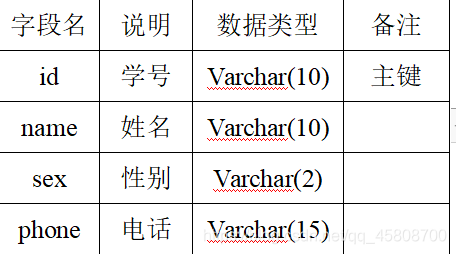
(1)新建一个DpHelper类继承SQLiteOpenHelper,通过构建方法启动数据库连接。构建createtable()方法完成建表操作,在数据库中建立一个学生信息表:

(2)构建insert(String id, String name, String sex, String phone)方法实现插入记录操作,构建 delete(String id)方法实现删除记录操作,构建update(String id, String name, String sex, String phone)方法实现更新记录操作,构建select(String id)方法实现查询某一记录操作,构建selectAll()方法实现查询所有记录操作。

3. 实现学生信息管理应用

(1)完善相关代码,实现学生信息管理应用的基本功能。包括:

1. 学生信息列表:进入应用程序后,在ListView中自动加载所有已有学生的信息(学号,姓名)。
2. 添加学生:单击“添加学生”按钮,打开相应的界面stuinfo.xml填写新学生信息,单击“确认”按钮后完成
3. 添加学生操作。要求程序能够识别用户输入完整性(学号、姓名为必填项),如果新学生学号与现有学生相同,应提示更换学号。添加完成后返回主界面,同时更新ListView的内容。
4. 删除学生:根据ListView长按位置得到要删除的学生的学号信息,完成删除操作,删除后更新ListView的内容。
5. 修改学生:根据ListView长按位置得到要修改的学生的相关信息,打开相应的界面stuinfo.xml,将学生原始信息自动填入对应的输入框中,点击确认按钮后完成更新学生信息操作。要求程序能够识别用户输入完整性(学号、姓名为必填项),如果新学生学号与现有学生相同,应提示更换学号。修改完成后返回主界面,同时更新ListView的内容。

(2)测试相关功能,添加若干条学生信息(3条以上),再进行信息修改、删除操作的测试。

二:演示截图

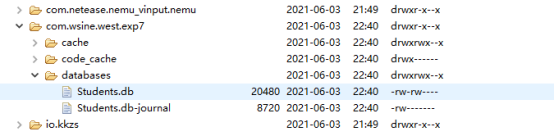
数据库:

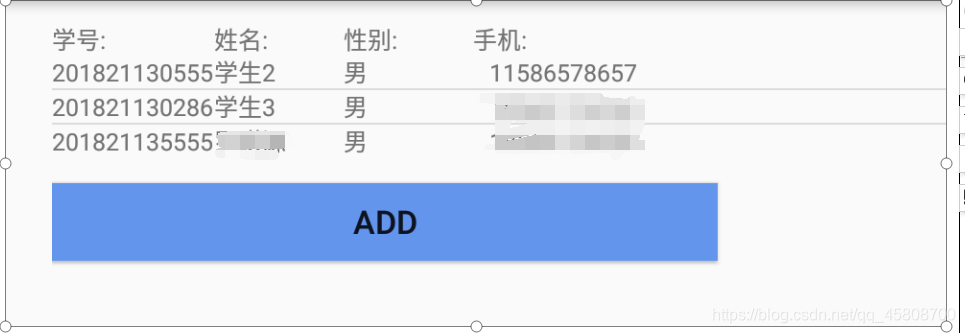
没有填入数据时,显示学生,姓名,性别,手机:

插入学生数据:

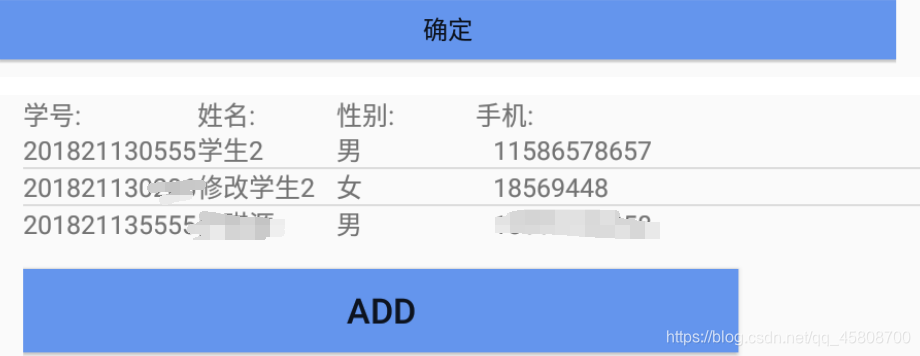
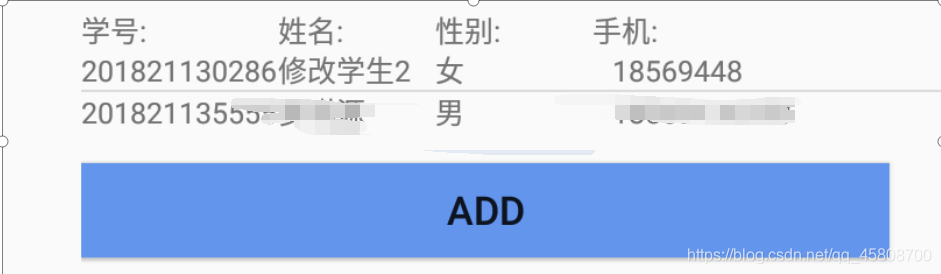
插入数据后:

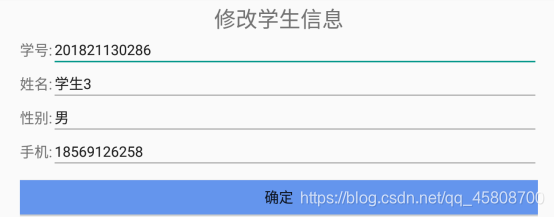
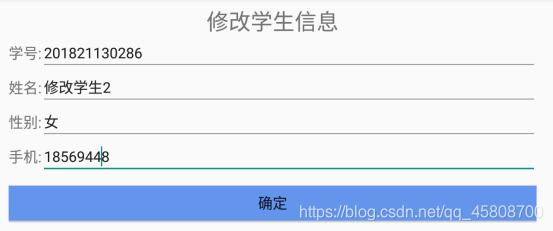
单击某行进行学生信息修改:


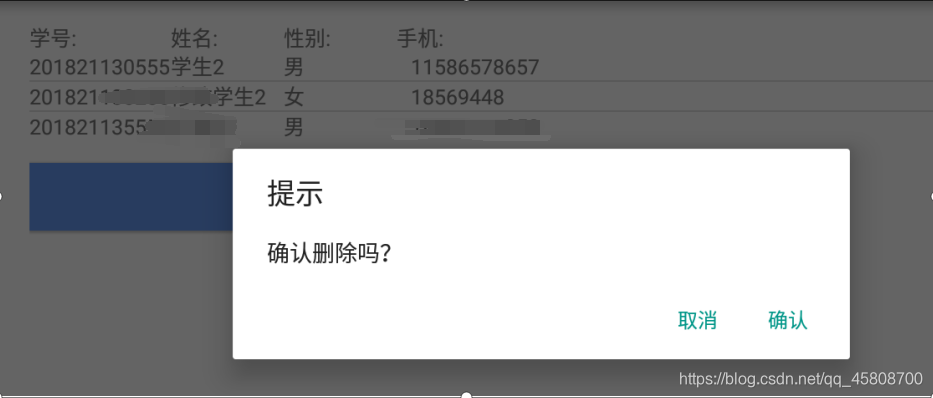
长按提示是否删除,确认后删除:

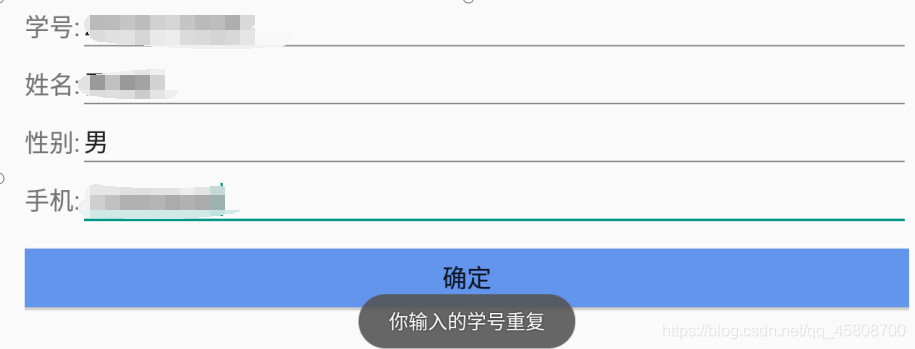
如果添加的学号重复:提示学号重复

实现代码

1
2
3
4
5
6
7
8
9
10
11
12
13
14
15
16
17
18
19
20
21
22
23
24
25
26
27
28
29
30
31
32
33
34
35
36
37
38
39
40
41
42
43
44
45
46
47
48
49
50
51
52
53
54
55
56
57
58
<LinearLayout xmlns:android="http://schemas.android.com/apk/res/android"
xmlns:tools="http://schemas.android.com/tools"
android:layout_width="match_parent" android:layout_height="match_parent"
android:paddingLeft="@dimen/activity_horizontal_margin" android:paddingRight="@dimen/activity_horizontal_margin"
android:paddingTop="@dimen/activity_vertical_margin" android:paddingBottom="@dimen/activity_vertical_margin"
android:orientation="vertical"
tools:context=".MainActivity">

<LinearLayout
android:layout_width="fill_parent"
android:layout_height="wrap_content"
android:orientation="horizontal">
<TextView
android:layout_width="@dimen/item_no_width"
android:layout_height="wrap_content"
android:gravity="left"
android:textSize="@dimen/item_font_size"
android:text="@string/no"/>
<TextView
android:layout_width="@dimen/item_name_width"
android:layout_height="wrap_content"
android:gravity="left"
android:textSize="@dimen/item_font_size"
android:text="@string/name"/>
<TextView
android:layout_width="@dimen/item_name_width"
android:layout_height="wrap_content"
android:gravity="left"
android:textSize="@dimen/item_font_size"
android:text="性别:"/>
<TextView
android:layout_width="fill_parent"
android:layout_height="wrap_content"
android:gravity="left"
android:textSize="@dimen/item_font_size"
android:text="@string/phone"/>

</LinearLayout>

<ListView
android:id="@+id/lv_contact"
android:layout_width="fill_parent"
android:layout_height="wrap_content">

</ListView>

<Button
android:id="@+id/btn_add"
android:layout_width="411dp"
android:layout_height="wrap_content"
android:layout_gravity="bottom"
android:layout_marginTop="@dimen/margin_fix"
android:background="@color/btn_blue"
android:text="@string/add"
android:textSize="@dimen/btn_add_size" />

</LinearLayout>

1
2
3
4
5
6
7
8
9
10
11
12
13
14
15
16
17
18
19
20
21
22
23
24
25
26
27
28
29
30
31
32
<?xml version="1.0" encoding="utf-8"?>
<LinearLayout xmlns:android="http://schemas.android.com/apk/res/android"
android:layout_width="match_parent" android:layout_height="match_parent"
android:orientation="horizontal">
<TextView
android:layout_width="@dimen/item_no_width"
android:layout_height="wrap_content"
android:gravity="left"
android:id="@+id/contact_no"
android:textSize="@dimen/item_font_size"/>
<TextView
android:layout_width="@dimen/item_name_width"
android:layout_height="wrap_content"
android:gravity="left"
android:id="@+id/contact_name"
android:textSize="@dimen/item_font_size"/>

<TextView
android:id="@+id/contact_sex"
android:layout_width="90dp"
android:layout_height="wrap_content"
android:gravity="left"
android:textSize="@dimen/item_font_size" />

<TextView
android:id="@+id/contact_phonenumber"
android:layout_width="fill_parent"
android:layout_height="wrap_content"
android:gravity="left"
android:textSize="@dimen/item_font_size" />
</LinearLayout>

1
2
3
4
5
6
7
8
9
10
11
12
13
14
15
16
17
18
19
20
21
22
23
24
25
26
27
28
29
30
31
32
33
34
35
36
37
38
39
40
41
42
43
44
45
46
47
48
49
50
51
52
53
54
55
56
57
58
59
60
61
62
63
64
65
66
67
68
69
70
71
72
73
74
75
76
77
78
79
80
81
82
83
84
85
86
87
88
89
90
91
<LinearLayout xmlns:android="http://schemas.android.com/apk/res/android"
xmlns:tools="http://schemas.android.com/tools"
android:layout_width="match_parent" android:layout_height="match_parent"
android:paddingLeft="@dimen/activity_horizontal_margin" android:paddingRight="@dimen/activity_horizontal_margin"
android:paddingTop="@dimen/activity_vertical_margin" android:paddingBottom="@dimen/activity_vertical_margin"
android:orientation="vertical"
tools:context="com.wsine.west.exp7.DetailActivity">

<TextView
android:layout_width="wrap_content"
android:layout_height="wrap_content"
android:layout_gravity="center"
android:id="@+id/detail_title"
android:textSize="@dimen/title_size"/>

<LinearLayout
android:layout_width="match_parent"
android:layout_height="wrap_content">
<TextView
android:layout_width="wrap_content"
android:layout_height="match_parent"
android:text="@string/no"
android:textSize="@dimen/label_size"
android:gravity="center_vertical"/>
<EditText
android:layout_width="fill_parent"
android:layout_height="wrap_content"
android:id="@+id/Et_no"
android:textSize="@dimen/label_size"/>
</LinearLayout>

<LinearLayout
android:layout_width="match_parent"
android:layout_height="wrap_content">
<TextView
android:layout_width="wrap_content"
android:layout_height="match_parent"
android:text="@string/name"
android:textSize="@dimen/label_size"
android:gravity="center_vertical"/>
<EditText
android:layout_width="fill_parent"
android:layout_height="wrap_content"
android:id="@+id/Et_name"
android:textSize="@dimen/label_size"/>
</LinearLayout>

<LinearLayout
android:layout_width="match_parent"
android:layout_height="wrap_content">
<TextView
android:layout_width="wrap_content"
android:layout_height="match_parent"
android:text="性别:"
android:textSize="@dimen/label_size"
android:gravity="center_vertical"/>
<EditText
android:layout_width="fill_parent"
android:layout_height="wrap_content"
android:id="@+id/Et_sex"
android:textSize="@dimen/label_size"/>
</LinearLayout>

<LinearLayout
android:layout_width="match_parent"
android:layout_height="wrap_content">
<TextView
android:layout_width="wrap_content"
android:layout_height="match_parent"
android:text="@string/phone"
android:textSize="@dimen/label_size"
android:gravity="center_vertical"/>
<EditText
android:layout_width="fill_parent"
android:layout_height="wrap_content"
android:id="@+id/Et_phone"
android:textSize="@dimen/label_size"/>
</LinearLayout>

<Button
android:layout_width="fill_parent"
android:layout_height="wrap_content"
android:layout_marginTop="@dimen/margin_fix"
android:layout_gravity="center"
android:id="@+id/btn_confirm"
android:textSize="@dimen/btn_add_size"
android:text="@string/confirm"
android:background="@color/btn_blue"/>

</LinearLayout>

1
2
3
4
5
6
7
8
9
10
11
12
13
14
15
16
17
18
19
20
21
22
23
24
25
26
27
28
29
30
31
32
33
34
35
36
37
38
39
40
41
42
43
44
45
46
47
48
49
50
51
52
53
54
55
56
57
58
59
60
61
62
63
package com.wsine.west.exp7;

/**
* Created by West on 2015/11/25.
*/
public class Contact {
private int id;
private String no;
private String sex;
private String name;
private String phoneNumber;

public Contact(String no, String name, String sex, String phoneNumber) {
this.no = no;
this.sex = sex;
this.name = name;
this.phoneNumber = phoneNumber;
}

public Contact(int id, String no, String name, String sex, String phoneNumber) {
this.id = id;
this.no = no;
this.sex = sex;
this.name = name;
this.phoneNumber = phoneNumber;
}

public Contact() {}
public Contact(String _name, String _phoneNumber) {
this.name = _name;
this.phoneNumber = _phoneNumber;
}
public Contact(String _no, String _name, String _phoneNumber) {
this.no = _no;
this.name = _name;
this.phoneNumber = _phoneNumber;
}

public String getNo() { return no; }
public void setNo(String _no) { this.no = _no; }

public String getSex() {
return sex;
}

public void setSex(String sex) {
this.sex = sex;
}

public String getName() { return name; }
public void setName(String _name) { this.name = _name; }
public String getPhoneNumber() { return phoneNumber; }
public void setPhoneNumber(String _phoneNumber) { this.phoneNumber = _phoneNumber; }

public void setId(int id) {
this.id = id;
}

public int getId() {
return id;
}
}

1
2
3
4
5
6
7
8
9
10
11
12
13
14
15
16
17
18
19
20
21
22
23
24
25
26
27
28
29
30
31
32
33
34
package com.wsine.west.exp7;

import android.content.Context;
import android.view.View;
import android.view.ViewGroup;
import android.widget.SimpleAdapter;

import java.util.ArrayList;
import java.util.List;
import java.util.Map;

/**
* Created by West on 2015/11/25.
*/
public class MySimpleAdapter extends SimpleAdapter {
private ArrayList<Map<String, String>> mData;

public ArrayList<Map<String, String>> getmData() {
return mData;
}

public MySimpleAdapter(Context context, List<? extends Map<String, ?>> data,
int resource, String[] from, int[] to) {
super(context, data, resource, from, to);
this.mData = (ArrayList<Map<String, String>>)data;
}

@Override
public View getView(int position, View convertView, ViewGroup parent) {
final int mPosition = position;
return super.getView(position, convertView, parent);
}
}

1
2
3
4
5
6
7
8
9
10
11
12
13
14
15
16
17
18
19
20
21
22
23
24
25
26
27
28
29
30
31
32
33
34
35
36
37
38
39
40
41
42
43
44
45
46
47
48
49
50
51
52
53
54
55
56
57
58
59
60
61
62
63
64
65
66
67
68
69
70
71
72
73
74
75
76
77
78
79
80
81
82
83
84
85
package com.wsine.west.exp7;

import android.content.ContentValues;
import android.content.Context;
import android.database.Cursor;
import android.database.sqlite.SQLiteDatabase;
import android.database.sqlite.SQLiteOpenHelper;
import android.widget.Toast;

import static android.widget.Toast.LENGTH_SHORT;

/**
* Created by West on 2015/11/25.
*/
public class MyDatabaseHelper extends SQLiteOpenHelper {
private static final String DB_NAME = "Contacts.db";
private static final String TABLE_NAME = "Contacts";
private static final int DB_VERSION = 1;

public MyDatabaseHelper(Context context) {
super(context, DB_NAME, null, DB_VERSION);
}

@Override
public void onCreate(SQLiteDatabase db) {
String CREATE_TABLE = "create table " + TABLE_NAME
+ " (_id integer primary key autoincrement, "
+ "_no text not null, "
+ "_name text not null, "
+ "_sex text,"
+ "_pnumber text);";
db.execSQL(CREATE_TABLE);
}

@Override
public void onUpgrade(SQLiteDatabase db, int oldVersion, int newVersion) {
String DROP_TABLE = "DROP TABLE IF exists " + TABLE_NAME;
db.execSQL(DROP_TABLE);
onCreate(db);
}

public long insert(Contact entity) {
SQLiteDatabase db = getWritableDatabase();
ContentValues values = new ContentValues();
values.put("_no", entity.getNo());
values.put("_name", entity.getName());
values.put("_sex", entity.getSex());
values.put("_pnumber", entity.getPhoneNumber());
long id = db.insert(TABLE_NAME, null, values);
db.close();
return id;
}

public int update(Contact entity,String oldNo) {
SQLiteDatabase db = getWritableDatabase();
String whereClause = "_no = ?";
String[] whereArgs = { oldNo};

ContentValues values = new ContentValues();
values.put("_no", entity.getNo());
values.put("_name", entity.getName());
values.put("_sex", entity.getSex());
values.put("_pnumber", entity.getPhoneNumber());
int rows = db.update(TABLE_NAME, values, whereClause, whereArgs);
db.close();
return rows;
}

public int delete(Contact entity) {
SQLiteDatabase db = getWritableDatabase();
String whereClause = "_no = ?";
String[] whereArgs = { entity.getNo() };

int rows = db.delete(TABLE_NAME, whereClause, whereArgs);
db.close();
return rows;
}

public Cursor query() {
SQLiteDatabase db = getReadableDatabase();
return db.query(TABLE_NAME, null, null, null, null, null, null);
}

}

1
2
3
4
5
6
7
8
9
10
11
12
13
14
15
16
17
18
19
20
21
22
23
24
25
26
27
28
29
30
31
32
33
34
35
36
37
38
39
40
41
42
43
44
45
46
47
48
49
50
51
52
53
54
55
56
57
58
59
60
61
62
63
64
65
66
67
68
69
70
71
72
73
74
75
76
77
78
79
80
81
82
83
84
85
86
87
88
89
90
91
92
93
94
95
96
97
98
99
100
101
102
103
104
105
106
107
108
109
110
111
112
113
114
115
116
117
118
119
120
121
122
123
124
125
126
127
128
129
130
131
132
133
134
135
136
137
138
139
140
141
142
143
144
145
146
147
148
149
150
151
152
153
154
155
156
157
158
159
160
161
162
163
164
165
166
167
168
169
170
171
172
173
174
175
176
177
178
179
180
181
182
183
184
185
186
187
188
189
190
191
192
193
194
195
196
package com.wsine.west.exp7;

import android.app.AlertDialog;
import android.content.DialogInterface;
import android.content.Intent;
import android.database.Cursor;
import android.support.v7.app.AppCompatActivity;
import android.os.Bundle;
import android.util.Log;
import android.view.Menu;
import android.view.MenuItem;
import android.view.View;
import android.widget.AdapterView;
import android.widget.Button;
import android.widget.ListView;
import android.widget.Toast;

import java.util.ArrayList;
import java.util.Collection;
import java.util.HashMap;
import java.util.List;
import java.util.Map;

public class MainActivity extends AppCompatActivity {

private MyDatabaseHelper myDatabaseHelper = new MyDatabaseHelper(MainActivity.this);
private List<Map<String, String>> dataList = new ArrayList<Map<String, String>>();

@Override
protected void onCreate(Bundle savedInstanceState) {
super.onCreate(savedInstanceState);
setContentView(R.layout.activity_main);

MySimpleAdapter mySimpleAdapter=updateListView();
final ArrayList<Map<String, String>> mData=mySimpleAdapter.getmData();

Button btnAdd = (Button)this.findViewById(R.id.btn_add);
btnAdd.setOnClickListener(new View.OnClickListener() {
@Override
public void onClick(View view) {
Intent intent = new Intent(MainActivity.this, DetailActivity.class);
Bundle bundle = new Bundle();
int i=-1;
for (Map<String, String> m : mData){
i++;
Collection<String> valueCollection = m.values();
final int size = valueCollection.size();

List<String> valueList = new ArrayList<String>(valueCollection);

String[] valueArray = new String[size];
m.values().toArray(valueArray);
bundle.putString("No"+i, valueArray[3]);
}
bundle.putBoolean("AddorNot", true);
intent.putExtras(bundle);
int requestCode = 1;
startActivityForResult(intent, requestCode);
}
});

ListView lv = (ListView)this.findViewById(R.id.lv_contact);
lv.setOnItemClickListener(new AdapterView.OnItemClickListener() {
@Override
public void onItemClick(AdapterView<?> parent, View view, int position, long id) {
ListView listView = (ListView) parent;
HashMap<String, String> map = (HashMap<String, String>)listView.getItemAtPosition(position);

Intent intent = new Intent(MainActivity.this, DetailActivity.class);
Bundle bundle = new Bundle();
bundle.putBoolean("AddorNot", false);
int i=-1;
for (Map<String, String> m : mData){
i++;
Collection<String> valueCollection = m.values();
final int size = valueCollection.size();

List<String> valueList = new ArrayList<String>(valueCollection);

String[] valueArray = new String[size];
m.values().toArray(valueArray);
bundle.putString("No"+i, valueArray[3]);
}
bundle.putString("oldNo", map.get("no"));
bundle.putString("oldName", map.get("name"));
bundle.putString("oldSex", map.get("sex"));
bundle.putString("oldPNumber", map.get("pnumber"));
intent.putExtras(bundle);
int requestCode = 2;
startActivityForResult(intent, requestCode);
}
});
lv.setOnItemLongClickListener(new AdapterView.OnItemLongClickListener() {
@Override
public boolean onItemLongClick(AdapterView<?> parent, View view, int position, long id) {
ListView listView = (ListView) parent;
final HashMap<String, String> map = (HashMap<String, String>)listView.getItemAtPosition(position);
AlertDialog.Builder builder = new AlertDialog.Builder(MainActivity.this);
builder.setMessage("确认删除吗?");
builder.setTitle("提示");
builder.setPositiveButton("确认", new DialogInterface.OnClickListener() {
@Override
public void onClick(DialogInterface dialogInterface, int i) {
try {
myDatabaseHelper.delete(new Contact(map.get("no"), map.get("name"), map.get("sex"),map.get("pnumber")));
updateListView();
} catch (Exception e) {
Log.d("Hint", "Remove failed!");
}
}
});
builder.setNegativeButton("取消", new DialogInterface.OnClickListener() {
@Override
public void onClick(DialogInterface dialogInterface, int i) {
// nothing to do
}
});
builder.show();
return true;
}
});
}

private void setData(List<Map<String, String>> mDataList) {
Map<String, String> mData;
Cursor c = myDatabaseHelper.query();
while (c.moveToNext()) {
mData = new HashMap<String, String>();
mData.put("no", c.getString(c.getColumnIndex("_no")));
mData.put("name", c.getString(c.getColumnIndex("_name")));
mData.put("sex", c.getString(c.getColumnIndex("_sex")));
mData.put("pnumber", c.getString(c.getColumnIndex("_pnumber")));
mDataList.add(mData);

}
}

private MySimpleAdapter updateListView() {
dataList.clear();
setData(dataList);
MySimpleAdapter mySimpleAdapter = new MySimpleAdapter(this, dataList, R.layout.contact_item,
new String[] { "no", "name","sex", "pnumber" },
new int[] { R.id.contact_no, R.id.contact_name,R.id.contact_sex, R.id.contact_phonenumber });
ListView lv = (ListView)this.findViewById(R.id.lv_contact);
lv.setAdapter(mySimpleAdapter);
return mySimpleAdapter;
}

@Override
protected void onActivityResult(int requestCode, int resultCode, Intent data) {
Log.d("Hint", "requestCode = " + requestCode);
Log.d("Hint", "resultCode = " + resultCode);
if (resultCode == 0)
return;
String oldNo= data.getStringExtra("_oldNo");
String newNo = data.getStringExtra("_newNo");
String newName = data.getStringExtra("_newName");
String newSex = data.getStringExtra("_newSex");
String newPNumber = data.getStringExtra("_newPNumber");
switch (requestCode) {
case 1:
myDatabaseHelper.insert(new Contact(newNo, newName,newSex, newPNumber));
break;
case 2:
int i=myDatabaseHelper.update(new Contact(newNo, newName,newSex, newPNumber),oldNo);
Toast.makeText(this,""+i+"个修改成功", Toast.LENGTH_SHORT).show();
break;
default:
break;
}
updateListView();
}

@Override
public boolean onCreateOptionsMenu(Menu menu) {
// Inflate the menu; this adds items to the action bar if it is present.
getMenuInflater().inflate(R.menu.menu_main, menu);
return true;
}

@Override
public boolean onOptionsItemSelected(MenuItem item) {
// Handle action bar item clicks here. The action bar will
// automatically handle clicks on the Home/Up button, so long
// as you specify a parent activity in AndroidManifest.xml.
int id = item.getItemId();

//noinspection SimplifiableIfStatement
if (id == R.id.action_settings) {
return true;
}

return super.onOptionsItemSelected(item);
}
}

1
2
3
4
5
6
7
8
9
10
11
12
13
14
15
16
17
18
19
20
21
22
23
24
25
26
27
28
29
30
31
32
33
34
35
36
37
38
39
40
41
42
43
44
45
46
47
48
49
50
51
52
53
54
55
56
57
58
59
60
61
62
63
64
65
66
67
68
69
70
71
72
73
74
75
76
77
78
79
80
81
82
83
84
85
86
87
88
89
90
91
92
93
94
95
96
97
98
99
100
101
102
103
104
105
106
107
108
109
110
111
112
113
114
115
116
117
118
package com.wsine.west.exp7;

import android.content.Intent;
import android.support.v7.app.AppCompatActivity;
import android.os.Bundle;
import android.view.KeyEvent;
import android.view.Menu;
import android.view.MenuItem;
import android.view.View;
import android.widget.Button;
import android.widget.EditText;
import android.widget.TextView;
import android.widget.Toast;

public class DetailActivity extends AppCompatActivity {

@Override
protected void onCreate(Bundle savedInstanceState) {
super.onCreate(savedInstanceState);
setContentView(R.layout.stu_info);

TextView tvTitle = (TextView)this.findViewById(R.id.detail_title);
final EditText edtNo = (EditText)this.findViewById(R.id.Et_no);
final EditText edtName = (EditText)this.findViewById(R.id.Et_name);
final EditText edtSex = (EditText)this.findViewById(R.id.Et_sex);
final EditText edtPNumber = (EditText)this.findViewById(R.id.Et_phone);

final Bundle bundle = getIntent().getExtras();
final boolean addOrNot = bundle.getBoolean("AddorNot");
final int[] data=bundle.getIntArray("data");
if (addOrNot) {
tvTitle.setText(getResources().getString(R.string.titleAdd));
edtNo.setText("");
edtName.setText("");
edtSex.setText("");
edtPNumber.setText("");
} else {
tvTitle.setText(getResources().getString(R.string.titleModify));
edtNo.setText(bundle.getString("oldNo"));
edtName.setText(bundle.getString("oldName"));
edtSex.setText(bundle.getString("oldSex"));
edtPNumber.setText(bundle.getString("oldPNumber"));
}

Button btnConfirm = (Button)this.findViewById(R.id.btn_confirm);
btnConfirm.setOnClickListener(new View.OnClickListener() {
@Override
public void onClick(View view) {
String newNo = edtNo.getText().toString();
String newName = edtName.getText().toString();
String newSex = edtSex.getText().toString();
String newPNumber = edtPNumber.getText().toString();
Intent intent = new Intent();
intent.putExtra("_oldNo",bundle.getString("oldNo"));
intent.putExtra("_newNo", newNo);
intent.putExtra("_newName", newName);
intent.putExtra("_newSex", newSex);
intent.putExtra("_newPNumber", newPNumber);

for(int i=0;bundle.getString("No"+i)!=null;i++)
{ System.out.println("第"+i+"行");
System.out.println(bundle.getString("No"+i));
System.out.println(newNo);
if (newNo.isEmpty()
|| newPNumber.isEmpty()
|| newName.isEmpty()) {
Toast.makeText(getApplicationContext(), getResources().getString(R.string.msgWarning),Toast.LENGTH_SHORT).show();
return;
}
else if(newNo.equals(bundle.getString("No"+i))&&!newNo.equals(bundle.getString("oldNo")))
{
Toast.makeText(getApplicationContext(), getResources().getString(R.string.msgWarning2),Toast.LENGTH_SHORT).show();
return;
}
}
int resultCode = 0;
if (addOrNot) resultCode = 1;
else resultCode = 2;

DetailActivity.this.setResult(resultCode, intent);
DetailActivity.this.finish();
}
});
}

@Override
public boolean onKeyDown(int keyCode, KeyEvent event) {
if(keyCode == KeyEvent.KEYCODE_BACK) {
int resultCode = 0;
DetailActivity.this.setResult(resultCode);
DetailActivity.this.finish();
}
return true;
}

@Override
public boolean onCreateOptionsMenu(Menu menu) {
// Inflate the menu; this adds items to the action bar if it is present.
getMenuInflater().inflate(R.menu.menu_detail, menu);
return true;
}

@Override
public boolean onOptionsItemSelected(MenuItem item) {
// Handle action bar item clicks here. The action bar will
// automatically handle clicks on the Home/Up button, so long
// as you specify a parent activity in AndroidManifest.xml.
int id = item.getItemId();

//noinspection SimplifiableIfStatement
if (id == R.id.action_settings) {
return true;
}

return super.onOptionsItemSelected(item);
}
}

1
2
3
4
5
6
7
8
9
10
11
12
13
14
15
16
17
18
19
20
21
<resources>
<string name="app_name">Exp7</string>

<string name="hello_world">Hello world!</string>
<string name="action_settings">Settings</string>
<string name="title_activity_detail">DetailActivity</string>

<string name="add">Add</string>

<string name="no">学号:</string>
<string name="name">姓名:</string>
<string name="phone">手机:</string>
<string name="confirm">确定</string>

<string name="titleAdd">添加联系人</string>
<string name="titleModify">修改联系人</string>

<string name="msgWarning">您输入的内容为空</string>
<string name="msgWarning2">你输入的学号重复</string>
</resources>

源码下载:https://download.csdn.net/download/qq_45808700/19525532

-------------本文结束感谢您的阅读-------------